

You create the moments. We handle the rest.
From weddings and events to vacation rentals and beyond, Foxie provides a dedicated text number, intelligent automation, and contact management together in one dashboard. Simplify communication, save time, and stay connected effortlessly.






Too many questions & channels.
Not enough time.
Every day, the same questions come from different directions. Texts, emails, calls, and last-minute requests pile up, pulling your attention away from what matters most. Whether you're coordinating a wedding, managing an event, or running a business, keeping everyone informed shouldn't feel like a full-time job.
That's where Foxie comes in. The LinkMy Suite brings intelligent messaging, contact and guest management together in one dashboard. With a dedicated text number and an AI Assistant that handles everyday questions, you can spend less time responding and more time with your guests, clients and customers.
Fewer interruptions.
Better communication.
Why a text number
Powerful communication, as simple as sending a text.
No complicated technology. No learning curve. Foxie makes intelligent communication accessible through something everyone already knows how to use: text messaging. Whether you're connecting with guests, clients, or customers, getting answers and staying informed is as simple as sending a message.
01
Nothing to download.
No downloads, accounts to create, or passwords to remember. Contacts simply send a text to your dedicated Foxie number and get the information they need.
02
Easy for everyone.
From tech-savvy guests to those who prefer to keep things simple, texting makes it easy for everyone to connect, ask questions, and receive helpful information.
03
No Wi-Fi required.
Traditional SMS works over your cellular network, so guests and customers can send and receive messages without connecting to Wi-Fi or using mobile data.
04
Keep your personal number private.
Give guests, clients, and customers a dedicated number to reach you without sharing your personal cell phone number. Keep conversations organized, maintain boundaries, and stay in control.
How it works
Live about a day after your demo.
Getting started with Foxie is simple. We set up your dedicated number, then help you add the details your AI Assistant answers from, so you're ready to connect with your guests, clients, or customers quickly.
- 1
A quick demo is all it takes.
Schedule a 15-minute demo with our team. We'll learn about your business or event, walk you through the dashboard, and show you how Foxie can simplify communication and save you time.
- 2
We set up your number.
We'll get your dedicated number and dashboard ready, then help you add the details that matter most for your AI Assistant: event info, schedules, locations, FAQs, contacts, and more. Already have a business line? We can add texting to it, which takes a little longer.
- 3
Share your number.
Add your number to invitations, confirmations, websites, or wherever people connect with you. Your AI Assistant handles common questions automatically and keeps you in the loop when a personal response is needed.
Your personal AI Assistant
It knows the details, so you don't have to repeat them.
- The date, the time and the place
- Directions, parking and which door to use
- Each person’s own RSVP, shared only with them
- Tables, meals and what to wear, if you have them
- Door codes and Wi-Fi information
- Everything in your FAQs
- Websites you want to direct people to use
When it doesn't know, it doesn't guess, and it doesn't reply. It texts you, so you can answer the person yourself.
AI Assistant · Your number
Answers from your details
What stays human
Smart automation.
Human connection.
The AI Assistant handles everyday questions and conversations using the information you provide, delivering helpful, relevant responses without adding more to your plate. When a question needs your attention or falls outside the information available, Foxie brings you into the conversation. You'll have the full message history right in your dashboard, making it easy to respond personally and keep things moving.
The LinkMy Suite
Every conversation.
One dashboard.
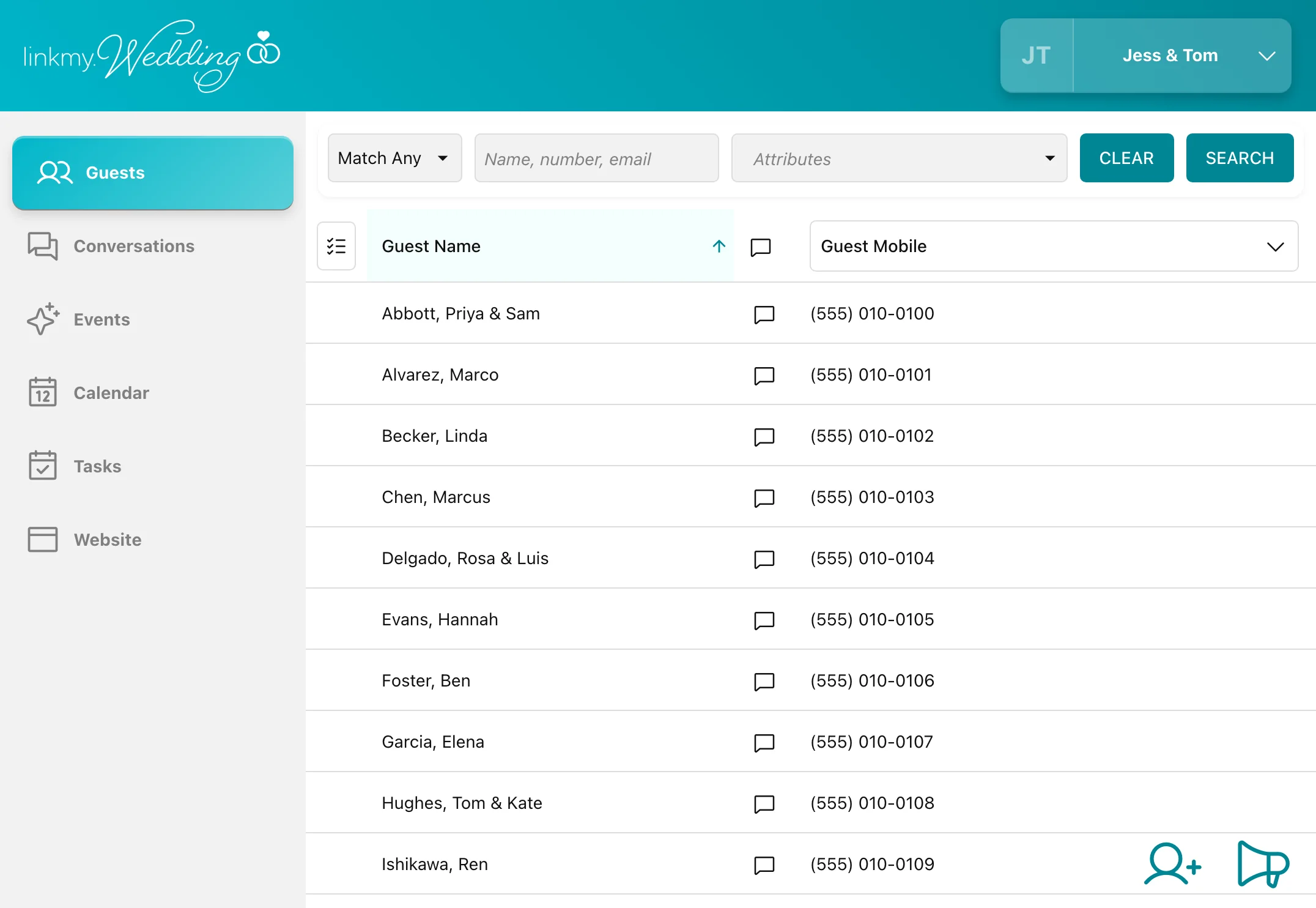
Keep your conversations, contacts, and communication tools organized in one place. With Foxie, your team can manage incoming messages, view complete conversation histories, and step in whenever a personal response is needed. From managing guest and contact lists to scheduling tasks and reminders, everything works together to keep you organized and one step ahead. One number. One dashboard. A smarter way to communicate.
-
Conversations, all in one place
Keep every message organized in its own conversation thread. No group threads here. Foxie's AI Assistant handles common questions, allowing you to seamlessly step in whenever a personal touch is needed.
-
One message, no messy group texts
Send one message to an entire contact list or a specific group using tags. Each recipient receives an individual text. Write it ahead of time and schedule it to send automatically, for reminders, updates and follow-ups.
-
Contacts, tags and search
Import your existing contact lists, organize them with custom tags, and find any contact or conversation by name, phone number, tag or message. Export your contacts whenever you need them.
-
Photos, links and more
Send photos, helpful links and more right from your dashboard. From directions and important documents to event details, keep everyone informed.
-
Snippets
Create and save frequently used messages so you can respond quickly and consistently without typing the same information over and over.
-
RSVPs, a calendar and a to-do list
Collect RSVPs and meal choices, keep important dates and scheduled messages together on one calendar, and track tasks and follow-ups on a to-do list. Foxie's AI Assistant uses your event information to answer guests' questions.
Your website
Your website. Your number.
Every LinkMy dashboard comes with a customizable website designed to keep your guests, clients, or customers informed, whether it's a wedding, an event or a rental. Choose your layout, personalize your content, and showcase important details, photos, schedules, FAQs, and more. Visitors can find information, access helpful links, and RSVP to events, all from a mobile-friendly experience.
Best of all, your website and AI Assistant work from the same information, helping deliver consistent answers and a seamless communication experience.
“I was very impressed that I could access the backend via any device or browser. Christina and I prefer using our phones for productivity, so mobile support was greatly appreciated.”
Questions
The questions people ask us first. If yours isn't here, bring it to the demo, or email info@foxie.com.
What does it cost? +
LinkMy.Wedding and LinkMy.Events are $99 a month for up to 120 people, or $199 for up to 250. For our other products, pricing depends on several factors, so give us a call.
Do people need an app, or the internet? +
No app, and no internet. It's a regular text message, so any phone with a signal works.
Can our business keep the number it already has? +
Often, yes. We can use your existing business line for texts, and your phone system stays the same, so you take calls the way you always have. This doesn't work with mobile numbers.
Does it connect to the tools we already use? +
Not directly, for now. You bring people in by importing a spreadsheet, or a file exported from your other tools, and you can export your contacts back out.
What happens in the demo? +
It's a 15-minute demo with someone from our team. We show you everything and answer your questions. Ask for one on our contact page, and we'll email you times.
Do you work with wedding planners? +
Absolutely. Planner Edition was designed with the wedding planner in mind. Planners get all the tools and resources to manage multiple weddings and communicate with clients, guests and vendors from one unified system.
Can we stop at any time? +
Yes. Export your contacts first, and they're yours to keep.
What happens to the number when we’re done? +
If you stay with us, or move to another LinkMy product, the number stays yours. If you're done, let our team know and we'll close the account and remove the number. Brought your own number? We can help you move it elsewhere.
How do people stop getting texts? +
When someone replies STOP, our system marks them as opted out, and you can no longer text them: if you try, the system blocks the message. To start getting texts again, they reply START.
What if the AI Assistant gets something wrong? +
It answers only from the details you give it. Correct the detail in your dashboard and every answer after that uses the new one, and you can reply to that person yourself in the meantime.
See how Foxie can work for you.
Discover how Foxie can simplify communication, automate everyday conversations, and keep everything in one dashboard. Schedule a 15-minute demo, and we'll show you everything and answer your questions about setup and pricing.